Bend Costing for Sheet Metal Parts
Automatic bend-line detection from your CAD files, with bend cost calculated per part — no manual counting.
How bend costing works
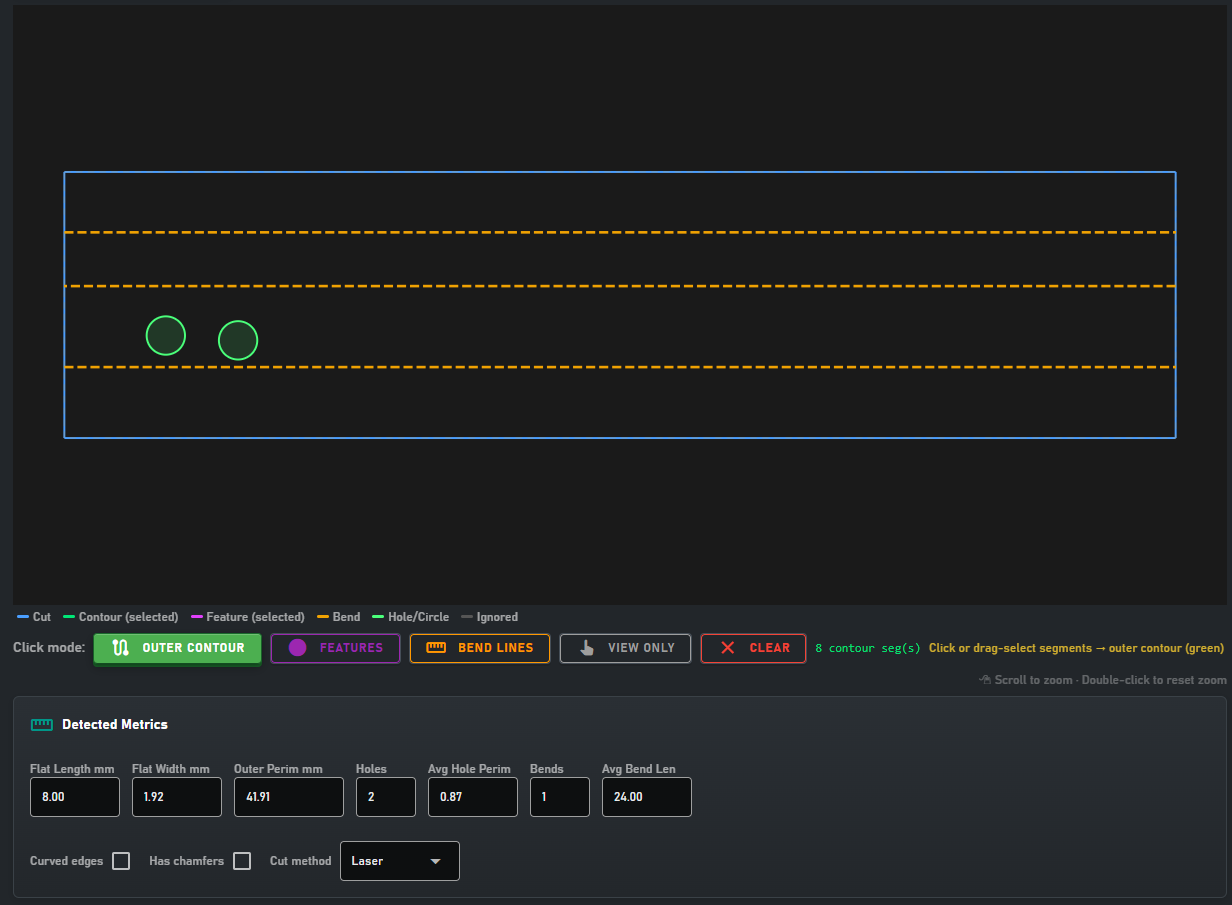
When you import a DXF or STEP file, Workshop Assistant automatically detects bend lines in the geometry and measures them. The DXF Geometry Editor also lets you manually classify bend lines where needed, and bend cost is calculated automatically based on the bend count and the bending machine settings you've configured.
Bend costing features
Automatic Bend Detection
Detects bend lines directly from DXF/STEP geometry — no manual counting required.
Visual Verification
View and edit detected bend lines directly on the geometry before costing.
Bending Machine Settings
Set cost per bend, speed, and labor rate for your workshop's bending machine.
"Bent" Classification Badge
Every part with bends is automatically flagged so it stands out in the offers list.
FAQ
How is bend cost calculated?+
Based on the number of detected bend lines per part, multiplied by the cost-per-bend you set in the Parameters Editor.
Does it auto-detect bends from both DXF and STEP?+
Yes — both DXF and STEP files are automatically analyzed for bend lines, with manual correction available in the Geometry Editor.
Can I see how many bends a part has before costing it?+
Yes, the detected-metrics panel shows the bend count per part before you generate the offer.
Try Bend Costing Yourself
Download the free trial and see how fast you can cost parts with bends.
Download Free Trial